Your container has arrived at the port, and your import documentation team is ready to clear the cargo. But before your Customs House Agent (CHA) can finalize the Bill of Entry (BOE), you must verify if the carrier has filed the Import General Manifest (IGM).
With the complete rollout of the ICEGATE 2.0 portal, the old tracking links and legacy verification pages are gone. The system has shifted entirely to a centralized layout called Public Enquiries 2.0.
Whether you are tracking an ocean freight container (SAM/IGM) or an air freight shipment (Air-IGM), here is the updated step-by-step guide to verifying your IGM status, port location, and manifest details using the live 2026 interface.
A Quick Refresh: What is IGM and Why is it Important?
- What is it? The IGM is an official declaration filed by the carrier (shipping line or airline) listing all cargo on board the arriving vessel.
- Why it matters: Indian Customs requires a perfect data match between your Bill of Entry and the carrier’s IGM entry (specifically matching weights, package counts, and BL numbers). If the shipping line delays filing or makes a typo, your cargo stays locked inside the terminal.
The Step-by-Step Guide to Finding IGM Details on ICEGATE 2.0
Follow this precise workflow to safely navigate the updated Indian Customs National Trade Portal:
1. Open the ICEGATE 2.0 Portal
Go to the official website: www.icegate.gov.in.
2. Select the “Enquiry” Service
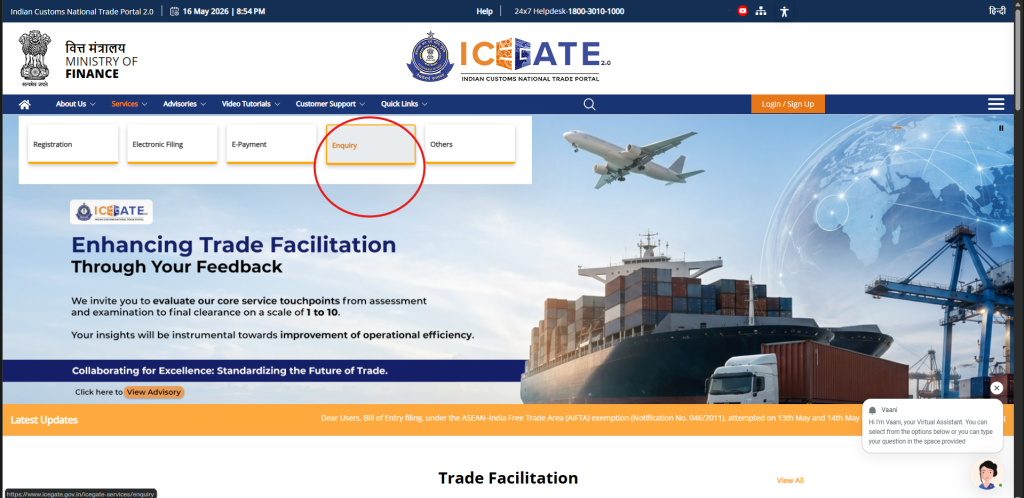
On the top main menu bar, hover over or click on Services. A secondary navigation row will drop down directly below it. Click on the golden-bordered Enquiry tab.
3. Access Public Enquiries 2.0
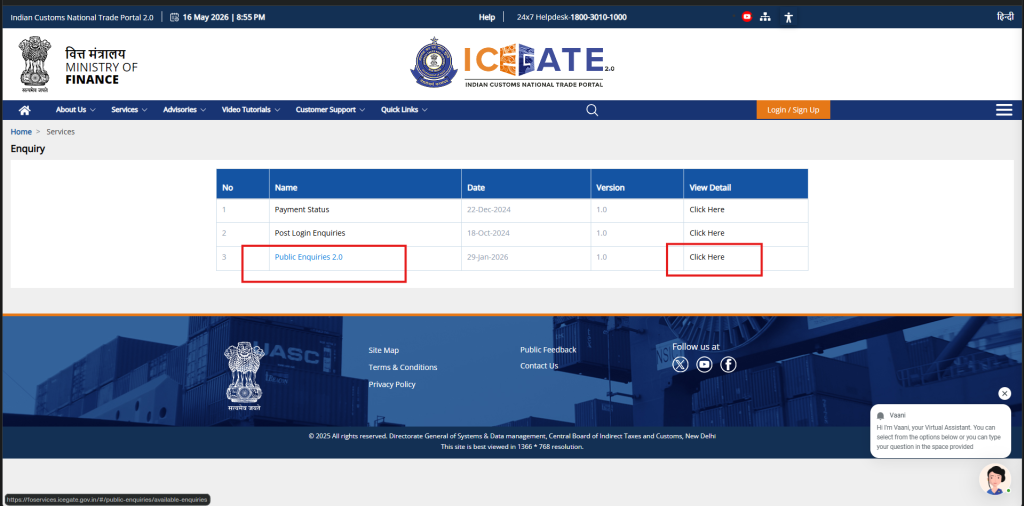
On the main Enquiry dashboard, look at the service ledger table. Locate row number 3, titled Public Enquiries 2.0, and click the corresponding “Click Here” link under the View Detail column.
4. Go to “Document Status”
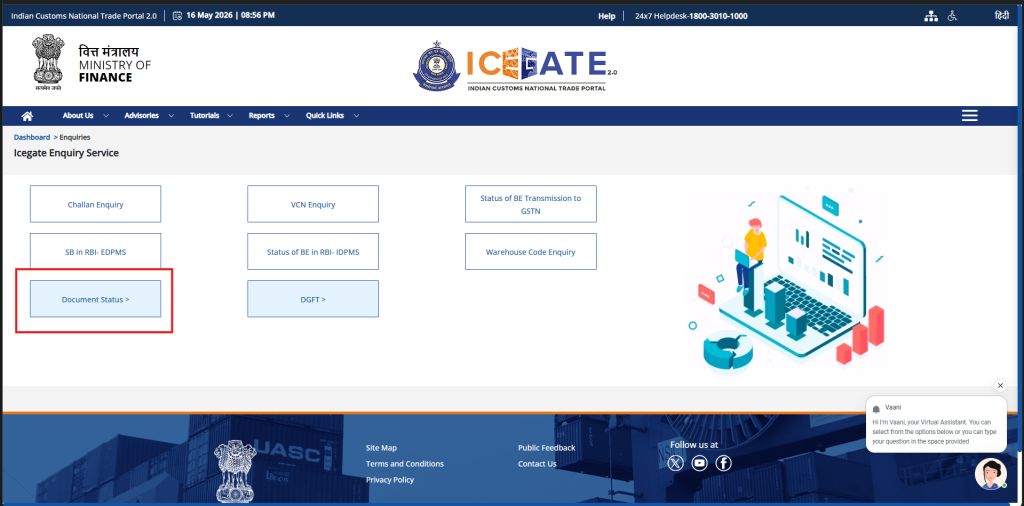
You will land on the Icegate Enquiry Service workspace containing multiple utility boxes (like Challan Enquiry and VCN Enquiry). Locate and click the box in the lower-left corner labeled Document Status >.
5. Choose Your Transport Mode (Air-IGM vs. SAM/IGM)
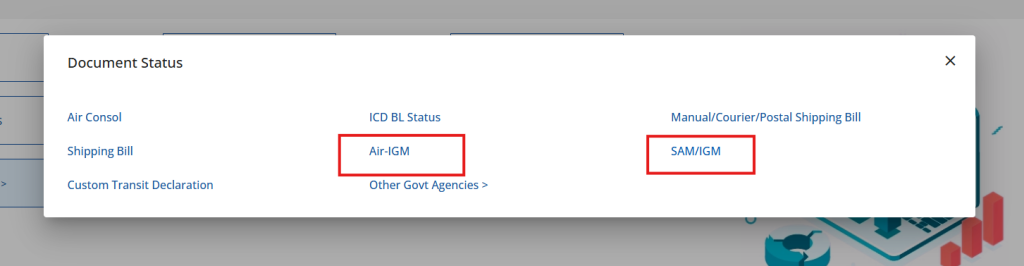
A clean white modal window titled Document Status will pop up on your screen. Depending on how your cargo traveled, click on the appropriate link:
- For Air Cargo: Click Air-IGM
- For Sea Cargo: Click SAM/IGM (Sea Arrival Manifest / Import General Manifest)
6. Enter Port Location and Document Number
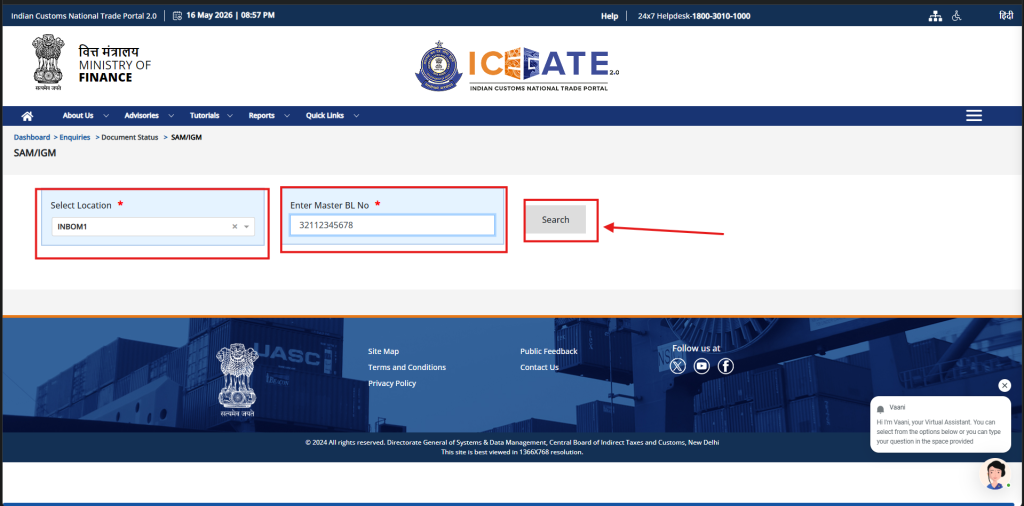
The system will redirect you to the final verification dashboard (Dashboard > Enquiries > Document Status > SAM/IGM). Input your exact tracking parameters:
- Select Location: Type or select the mandatory Indian Port Code from the dropdown menu (e.g.,
INBOM1for Mumbai Sea,INNSA1for Nhava Sheva). - Enter Master BL No / AWB No: Paste your official Master Bill of Lading (MBL) number or your numeric Air Waybill (AWB) digits cleanly into the field.
- Click the grey Search button.
Decoding Your Tracking Results
- If an active entry populates: The manifest has been successfully submitted by the carrier. Clicking on the entry details will display your official IGM Number, the IGM Date, and the assigned cargo Line Number.
- Sea Cargo Specifics: If you searched via an MBL, the results page will display all associated Container Numbers mapped to that specific customs line item.
- Inward Status: If the vessel has already received its physical port clearance, the live Inward Date will appear next to the IGM number, signaling that your agent can proceed with cargo examination or final duty payments.
Summary
The updated ICEGATE 2.0 framework removes the guesswork from Indian import documentation. By organizing cargo manifests under the Public Enquiries 2.0 banner, shippers can instantly confirm whether data flows correctly from the carrier to the customs gatehouse.
Once you have verified your official IGM details on the government portal, keep a close watch on your onward logistics. Track your container milestones seamlessly across terminals via TraceContainer.com, or monitor your air freight connections live using TraceAWB.com.